


In this unit, you will learn about NAMD's TclForces functionality. Although many user needs were anticipated in the development of NAMD, to anticipate them all specifically would be impossible. TclForces allows users to easily supplement the built-in constraint and force functionality with script-based forces.
The basic idea of tclForces is simple: we provide NAMD with a Tcl script which tells NAMD to apply certain forces to certain atoms.
The only special requirement of this script is that it define a command named calcforces.
This command is called by NAMD each timestep.
Within the script, we can access atomic IDs, positions and masses.
In this unit, we will see how to use tclForces through four examples of increasing complexity.
For our first exposure to tclForces, we will do something very simple: apply a constant net force to a system.
| tclforces on | |
| set linaccel "30 0 0" | |
| tclforcesscript push.tcl |
The first line simply turns tclForces on. The second sets a parameter for the acceleration that we'll use in the script, as we'll soon see. The last line is the name of the script which actually does the work.
![\framebox[\textwidth]{
\begin{minipage}{.2\textwidth}
\includegraphics[width=2...
...r}\\ \\
This is most useful for particularly short scripts.
}
\end{minipage} }](img7.gif)
| set numatoms 1231 |
| set atoms {} | |
| for { set i 1 } { $i <= $numatoms } { incr i } { | |
| lappend atoms $i | |
| } |
| foreach atom $atoms { | |
| addatom $atom | |
| } |
The structure we're using is ubiquitin, the same protein used in the VMD and NAMD Tutorials. Here, we're using the protein alone, in vacuum, and so the structure contains just 1231 atoms. We first build a list of the atomic indices (NAMD atom indices, unlike VMD atom indices, start at 1.) For each atom, we then call the addatom command. This tells NAMD that we want access to this atom's coordinates. Forces may be applied to an atom without this call.
 ps
ps to the NAMD units kcal/molÅamu, and print some information:
| set linaccel_namd [vecscale [expr 1.0/418.68] $linaccel] | |
| print "Linear acceleration imparted: ($linaccel) Ang*ps^ -2" |
Note that to print messages from the force script, we must use the print command, instead of the usual puts command.
![\framebox[\textwidth]{
\begin{minipage}{.2\textwidth}
\includegraphics[width=2...
... unit of force is 1~kcal/mol$\cdot$\AA\ $\approx$\ 69.48~pN.
}
\end{minipage} }](img10.gif)
![\fbox{
\begin{minipage}{.2\textwidth}
\includegraphics[width=2.3 cm]{pictures/...
...cceleration, and thus the protein moves together as a whole.
}
\end{minipage} }](img11.gif)
| proc calcforces { } { | |
| global atoms numatoms linaccel_namd | |
| loadcoords coords | |
| loadmasses masses | |
| set comsum "0.0 0.0 0.0" | |
| set totalmass 0.0 | |
| foreach atom $atoms { | |
| set force [vecscale $masses($atom) $linaccel_namd] | |
| addforce $atom $force | |
| set tmp [vecscale $masses($atom) $coords($atom)] | |
| set comsum [vecadd $comsum $tmp] | |
| } | |
| set invmass [expr 1.0/$totalmass] | |
| print "Center of mass = [vecscale $invmass $comsum]" | |
| } |
The script starts with the global command, which imports the variables named so that they can be accessed in the calcforces command.
Next we call the command loadcoords. This sets the variable coords to a Tcl array of coordinates of the atoms that have been added using addatom. In this case, of course, that is all the atoms of the system. Array elements in Tcl are accessed using parentheses. Similarly, loadmasses retrieves the atomic masses, putting them in an array named masses.
Then we loop through the atoms, applying the specified force to each using the addforce command. Along the way, we also calculate the center of mass of the protein. We see two more Tcl commands in actions here: vecadd and vecscale. These add two vectors and multiply a vector by a scalar, respectively.
namd2 push.namd > push.log
![\framebox[\textwidth]{
\begin{minipage}{.2\textwidth}
\includegraphics[width=2...
...them yourself using the periodic cell dimensions and origin.
}
\end{minipage} }](img12.gif)
set log push.log
if you named the log file push.log. To run the script, either type
vmd -e plot.tcl
from the command line, or open VMD and source the script file in the Tk Console:
source plot.tcl
![\framebox[\textwidth]{
\begin{minipage}{.2\textwidth}
\includegraphics[width=2...
...onstant-pressure options for simulation in the NPT ensemble.
}
\end{minipage} }](img14.gif)
mol load psf common/ubiquitin.psf dcd push/push.dcd
If you could not produce the trajectory, there is a sample one in the example-output directory. Notice that the Langevin dynamics prevent the protein from moving too quickly.
We will now add a layer of complexity: we will force atoms differently based on their coordinates.
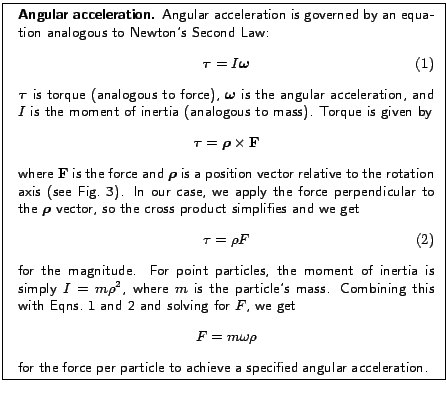
In this example, we will force atoms in such a way that, in addition to a linear force, the protein also rotates about an axis parallel to the z-axis and through the protein's center of mass.
| tclforces on | |
| set linaccel "30 0 0" | |
| set angaccel 1 | |
| tclforcesscript rot-a.tcl |
This is very similar to the previous example, but here we provide an additional scalar to describe the angular acceleration.
| set linaccel_namd [vecscale [expr 1.0/418.68] $linaccel] | |
| set angaccel_namd [expr $angaccel/418.68] |
| print "Linear acceleration: ($linaccel) Ang*ps^ -2" | |
| print "Angular acceleration: (0 0 $angaccel) Rad*ps^ -2" |
We convert to NAMD units, just like before. Then we print some informational text using the print command.
| proc calcforces { } { | |
| global atoms numatoms linaccel_namd angaccel_namd |
| loadcoords coords | |
| loadmasses masses |
| set comsum "0 0 0" | |
| set totalmass 0 | |
| foreach atom $atoms { | |
| set tmp [vecscale $masses($atom) $coords($atom)] | |
| set comsum [vecadd $comsum $tmp | |
| set totalmass [expr $totalmass + $masses($atom)] | |
| } | |
| set com [vecscale [expr 1.0/$totalmass] $comsum] | |
| print "Center of mass = $com" |
| foreach atom $atoms { | |
| set linforce [vecscale $masses($atom) $linaccel_namd] | |
| set r [vecsub $coords($atom) $com] | |
| set x [lindex $r 0] | |
| set y [lindex $r 1] | |
| set rho [expr sqrt($x*$x + $y*$y)] | |
| set phi [expr atan2($y, $x) + $M_PI/2] |
| if { $atom == 1 } { | |
| print "atom $atom: phi = $phi" | |
| } |
| set angdir "[expr cos($phi)] [expr sin($phi)] 0.0" | |
| set angmag [expr $masses($atom) * $angaccel_namd * $rho] | |
| set angforce [vecscale $angmag $angdir] | |
| set force [vecadd $linforce $angforce] | |
| addforce $atom $force | |
| } | |
| } |
The first section above calculates the distance from the rotation axis, rho, and the angle from the  axis at which the force should be applied, phi (
 from the angle of the position vector, hence the addition of
  radians.)
Fig. 3 shows how these variables are related.
radians.)
Fig. 3 shows how these variables are related.
After printing the force angle associated with one atom so we can monitor the rotation, we find a unit vector (i.e. a vector with length one) pointing in the phi direction. We then multiply this by the mass of the atom and its distance from our rotation axis, giving us the correct angular force for the angular acceleration requested in the NAMD configuration file. Finally, we add the linear and angular forces to get the total force.
namd2 rot-a.namd > rot-a.log
This should again take just a few minutes.
The result is shown in Fig. 4. Plot the center of mass as well, by opening plot.tcl and changing the var variable to "Center of mass". This can be accomplished by simply commenting the first set var line, and uncommenting the other:
| #set var "atom 1: phi" | |
| set var "Center of mass" |
mol load psf common/ubiquitin.psf dcd rot-a/rot-a.dcd
Challenge: Find the dependence of the terminal linear and angular velocities on the langevinDamping parameter of the simulation, set in the configuration file, as well as the dependence on the applied force.
This example deals with the important ability to force a subset of your atoms.
In this section, we will apply forces only to the backbone atoms of the protein.
We accomplish this by making a special ``target atom'' PDB file, using the beta column to mark the atoms we want to apply force to.
In addition, we will use the occupancy column to tell our script the atomic masses, in order to demonstrate how to provide the script with additional information.
Look at the end of the file, where we set up tclForces. We see a new line:
set targetAtomPdb ../common/ubiquitin_solvate_backbone.pdb
With this line, we specify the aforementioned target atom PDB file. Thus, our first task is to produce that file. We will use a VMD script to accomplish this.
| set pdb common/ubiquitin_solvate.pdb | |
| set psf common/ubiquitin_solvate.psf | |
| set targetPdb common/ubiquitin_solvate_backbone.pdb |
Next, we set the selection text we will use to select our atoms, and the beta value that these atoms will receive:
| set selection "protein and backbone" | |
| set targetMark "1.00" |
| mol load psf $psf pdb $pdb | |
| set all [atomselect top all] | |
| $all set beta 0 | |
| $all set occupancy 0 |
| set target [atomselect top $selection] | |
| set masses [$target get mass] | |
| $target set beta $targetMark | |
| $target set occupancy $masses |
| $all writepdb $targetPdb | |
| exit |
vmd -dispdev text -e makeTargetAtomPdb.tcl
(Note: For Windows users, open the VMD GUI and source the script file in the Tk Console.)
If you were unable to run the script, copy the file example-output/
ubiquitin_solvate_backbone.pdb into the common directory.
set targetMark 1.0
| set targets {} | |
| set masses {} | |
| set inStream [open $targetAtomPdb r] | |
foreach line [split [read $inStream]  n] { n] { |
|
| set type [string trim [string range $line 0 5]] | |
| set name [string trim [string range $line 12 15]] | |
| set resid [string trim [string range $line 22 25]] | |
| set beta [string trim [string range $line 60 65]] | |
| set occupancy [string trim [string range $line 54 59]] | |
| set segname [string trim [string range $line 72 75]] |
| if { ($type eq "ATOM" || $type eq "HETATM") \ | |
| && $beta == $targetMark } { | |
| lappend targets "$segname $resid $name" | |
| lappend masses $occupancy | |
| } | |
| } | |
| close $inStream |
| set atoms {} | |
| foreach target $targets { | |
| lassign $target segname resid atom | |
| set atomindex [atomid $segname $resid $atom] | |
| lappend atoms $atomindex | |
| addatom $atomindex | |
| } |
| set numatoms [llength $atoms] | |
| set linaccel_namd [vecscale [expr 1.0/418.68] $linaccel] | |
| set angaccel_namd [expr $angaccel/418.68] | |
| print "Linear acceleration: ($linaccel) Ang*ps^ -2" | |
| print "Angular acceleration: (0 0 $angaccel) Rad*ps^ -2" |
| proc calcforces { } { | |
| global atoms numatoms masses linaccel_namd angaccel_namd |
| loadcoords coords | |
| set comsum "0 0 0" | |
| set totalmass 0 | |
| foreach atom $atoms mass $masses { | |
| set tmp [vecscale $mass $coords($atom)] | |
| set comsum [vecadd $comsum $tmp] | |
| set totalmass [expr $totalmass + $mass] | |
| } | |
| set com [vecscale [expr 1.0/$totalmass] $coordsum] | |
| print "Center = $com" |
| foreach atom $atoms mass $masses { | |
| set linforce [vecscale $mass $linaccel_namd] | |
| set r [vecsub $coords($atom) $com] | |
| set x [lindex $r 0] | |
| set y [lindex $r 1] | |
| set rho [expr sqrt($x*$x + $y*$y)] | |
| set phi [expr atan2($y, $x) + $M_PI/2] |
| if { $atom == 1 } { | |
| print "atom $atom: phi = $phi" | |
| } |
| set angdir "[expr cos($phi)] [expr sin($phi)] 0.0" | |
| set angmag [expr $angaccel_namd * $rho * $mass] | |
| set angforce [vecscale $angmag $angdir] | |
| set force [vecadd $linforce $angforce] | |
| addforce $atom $force | |
| } | |
| } |
namd2 rot-b-short.namd > rot-b-short.log
If you have access to a cluster, run it on the cluster--refer to local instructions for how this is done. This simulation will run for just 100 steps, so that the benchmark times are printed. In the next section, we will see how to improve this performance.
If you are interested, examine the files rot-b-long.log and rot-b-long.dcd in the example-output directory, which were produced with a slightly longer simulation. When loading the trajectory in VMD, use the PSF common/ubiquitin_solvate.psf
In most cases, it's unnecessary to recalculate the force values applied at each time step.
Depending on the situation, one may be able to recalculate every 1000 steps, saving a lot of computational effort and therefore increasing the speed of the simulation.
In this section, we will see how to do that.
set forcesRecalcFreq 10
As its name implies, this parameter sets how often our forces will be recalculated.
| set forces {} | |
| foreach index $atoms { | |
| lappend forces "0.0 0.0 0.0" | |
| } |
| set forcecount $forcesRecalcFreq | |
| set printcount 0 |
| proc calcforces { } { | |
| global atoms numatoms forcemult masses avgmass forces | |
| global forcesRecalcFreq | |
| global forcecount printcount |
| foreach atom $atoms force $forces { | |
| addforce $atom $force | |
| } |
| if { $forcecount == [expr $forcesRecalcFreq - 1] } { | |
| print "Adding atoms prior to reconfiguring forces at |
|
| $printcount" | |
| foreach atom $atoms { | |
| addatom $atom | |
| } | |
| } |
As we will see shortly, we call clearconfig after the forces are recalculated. This call erases all addatom records; without it, the coordinates of the atoms added will be available every timestep, independently of whether we call loadcoords, and therefore much of the potential speed gain will be lost. However, this means that addatom must be called again each time we want to recalculate forces, and because of technical details it has to be done at least one step before the coordinates will be used.
| if { $forcecount == $forcesRecalcFreq } { | |
| print "Recalculating forces at $printcount" |
| loadcoords coords | |
| set comsum "0 0 0" | |
| set totalmass 0 | |
| foreach atom $atoms mass $masses { | |
| set tmp [vecscale $mass $coords($atom)] | |
| set comsum [vecadd $comsum $tmp] | |
| set totalmass [expr $totalmass + $mass] | |
| } | |
| set com [vecscale [expr 1.0/$totalmass] $comsum] | |
| print "Center of mass = $com" |
| set forces {} | |
| foreach atom $atoms mass $masses { | |
| set linforce [vecscale $mass $linaccel_namd] | |
| set r [vecsub $coords($atom) $com] | |
| set x [lindex $r 0] | |
| set y [lindex $r 1] | |
| set rho [expr sqrt($x*$x + $y*$y)] | |
| set phi [expr atan2($y, $x) + $M_PI/2] |
| if { $atom == 1 } { | |
| print "atom $atom: phi = $phi" | |
| } |
| set angdir "[expr cos($phi)] [expr sin($phi)] 0.0" | |
| set angmag [expr $angaccel_namd * $rho * $mass] | |
| set angforce [vecscale $angdir] | |
| set force [vecadd $linforce $angforce] | |
| lappend forces $force | |
| } |
| print "Step ${printcount}: Recalculated |
|
| [llength $forces] forces" | |
| set forcecount 0 | |
| clearconfig | |
| } | |
| incr forcecount | |
| incr printcount | |
| return | |
| } |
namd2 rot-c-short.namd > rot-c-short.log
Again, this is a short simulation, running 100 steps, just long enough for benchmark timing information to be printed. Compare the speed of this simulation to the last. There should be a significant difference--comparing the example files rot-b-short.log and rot-c-short.log, which were run on just a single CPU, there is nearly a 15% speed increase. As the size of the system and the number of CPUs increase, applying tclForces efficiently becomes even more important: comparing rot-c-long.log with rot-b-long.log, both run on 20 processors, rot-c is almost 60% faster!
Once again, there are sample output files, rot-c-long.dcd and rot-c-long.log in the example-output directory, and should again be loaded together with the PSF file common/ubiquitin_solvate.psf.
Challenge: Take the provided file kcsa_closed.pdb, and
use the partial structure kcsa_open.pdb as a target to open
the channel using tclForces.
You now know the basics of tclForces. In the next section, you will
learn about a similar feature of NAMD called tclBC, which is suitable for
different circumstances.
![\begin{figure}\begin{center}
\par
\par
\latex{
\includegraphics[scale=0.3]{pictures/COM}
}
\end{center}
\end{figure}](img13.gif)
![\begin{figure}\begin{center}
\par
\par
\latex{
\includegraphics[scale=0.25]{pictures/angle_diagram_plus}
}
\end{center}
\end{figure}](img18.gif)
![\begin{figure}\begin{center}
\par
\par
\latex{
\includegraphics[scale=0.3]{pictures/PHI}
}
\end{center}
\end{figure}](img20.gif)